How to Optimize Neural Amp Modeler Training
What is NAM (Neural Amp Modeler)?
Neural Amp Modeler is a free and open-source (FOSS) modeling solution similar to ToneX, Guitar Rig, NeuralDSP, and Tonocracy. It can even outperform some of these paid products, and has become a de-facto standard for guitar hardware modeling, including amps, cabinets, and pedals. In fact, you can use it to model all sorts of effects and outboard hardware, including tape saturation, tube saturation, MOSFET distortion, Neve preamps and channel strips, and much more!
How to use NAM profiles and IRs
NAM profiles are, in technical AI/ML terms, checkpoints which are created by feeding dry input and wet output audio files to an AI/ML model and getting the results. These checkpoint files are often called “NAM models”, “NAM profiles”, or “NAM captures”, even though the technical term for what’s under the hood is a “checkpoint”. These NAM files are used by a NAM-compatible plugin or hardware effects processor to turn the dry input of your guitar (or synth, or anything else) into a wet output, usually with distortion/saturation/fuzz/overdrive effects.
Impulse Responses (IRs) are the result of sending an input signal (typically a short click or a sine sweep) into either an effects processor or out of a speaker in a real-life physical space, and then using these “dry” and “wet” inputs to figure out how to capture the reverb/delay/echo effects of that effects processor or real-life physical space. You can load these IRs into a guitar cabinet modeling plugin or pedal, or even load them into Ableton Live’s Convolution Reverb Pro!
Combining the NAM checkpoint with an IR can allow you to capture both the pedalboard and amp effects, as well as the timbre of the cabinet and/or the reverb/delay/echo of the space in which the cabinet was recorded with a microphone at various angles and distances. This allows you to leave all of your bulky gear at home, while still being able to get amazing tones out of your modeling pedal or laptop. It also means that you can simply download the NAM profiles and IRs captured from rare and expensive equipment, using microphones most people can only dream of owning, for free!
Basic NAM training
Go to Tone3000.com and sign up to use their free online training service.
Read the capture instructions to get started without having to know anything about the technical details!
Advanced NAM training
You can download our customized fork of Neural Amp Modeler at this GitHub link. Just follow the instructions in the README.md file. If you are familiar with Python, setup is relatively easy.
NAM GUI trainer architecture options
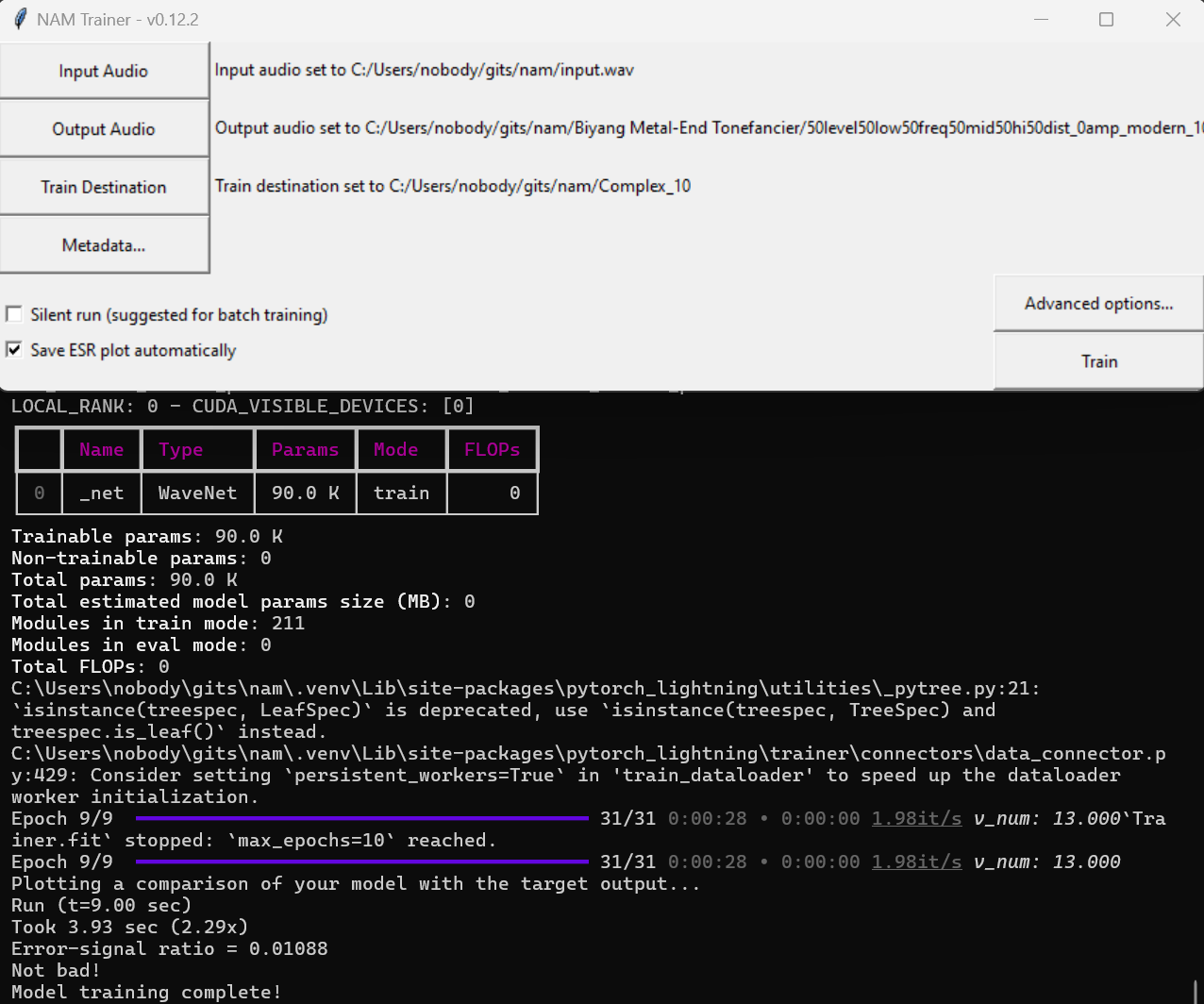
Once you have installed this NAM fork and its dependencies, you can fire up the NAM GUI trainer by simply activating the Python virtual environment and executing the command nam. From here, you can go into the Advanced menu to select the Complex, REVyHI, REVxSTD, or any of the normal architecture options. Complex captures more details at the cost of a bit more CPU power. REVxSTD is superior to the Standard option, while still being lighter on the CPU. REVyHI is in between the two.
NAM GUI trainer number of epochs
The number of epochs means the number of passes the NAM training code will make over the dry input and wet output, refining the model’s results each time. A typical number of epochs for great results is 100. Some people, especially if they sell “tone packs”, may use 1000 epochs or more. You get more refinements with more epochs, but the training takes longer, and you get diminishing returns the higher you go. The difference between a “95% perfect” and “99% perfect” result takes about as much time as just getting from zero to a “95% perfect” result in the first place.
Measuring the results
ESR is a typical means of measuring the accuracy of the results of the training. ESR = “error to signal ratio”. An ESR of less than 0.01 is considered good enough. Think of and ESR of 0.01 as being “99% accurate”, an ESR of 0.5 as being “50% accurate”, and an ESR of 0.008 as being “99.2% accurate”.
Why use this specific fork?
In this customized fork, you have the option to train your checkpoints (“make NAM profiles”) using advanced state-of-the-art options, such as the Complex and REVxSTD architectures. Additionally, the default settings and configuration files have been tweaked to make more efficient use of your computer’s hardware, meaning that you get a better result in less time. This fork allows you to get an ESR of 0.01 with as few as 10 epochs, giving you good results within mere minutes! While some people are training for 400, 1000, or even more epochs, taking days or even months to produce a full set of checkpoints which model all the best settings of their gear, this fork enables you to get great results in a fraction of the typical time needed to achieve such low ESR stats.
Example results
Check out this link to find real-world results created using this customized fork: Biyang Metal-End Tonefancier aka AKAI Deluxe Distortion