Updated for 2026!
How to split and separate stems
There are many options for stem splitting. Quality and accuracy vary wildly, because there are many different models, and each product or service may have a bias toward quick results versus high-quality results.
You are in luck though! The best solution is completely free!
If you need any assistance, or just want to hand off the job of stem separation to an experienced engineer, we are here to help! We offer state-of-the-art stem separation which never compromises on quality. Why waste hours of your time trying to rescue a low-quality stem, when you can start with the highest quality material?
Contact us today to take advantage of our $5 per separation job flat rate. Whether you need a vocal + instrumental stem; 4-part stem splitting job with separate drums, bass, vocals, and other instruments; or an even more specialized stem separation job such as isolating individual drum samples, we can deliver better results than any competitor, at a price that fits any budget!
We offer a 100% money back guarantee. If we can’t give you the best stem separation possible, we will refund 100% of your money. If you discover a better stem separation method, please let us know!
What settings should I use?
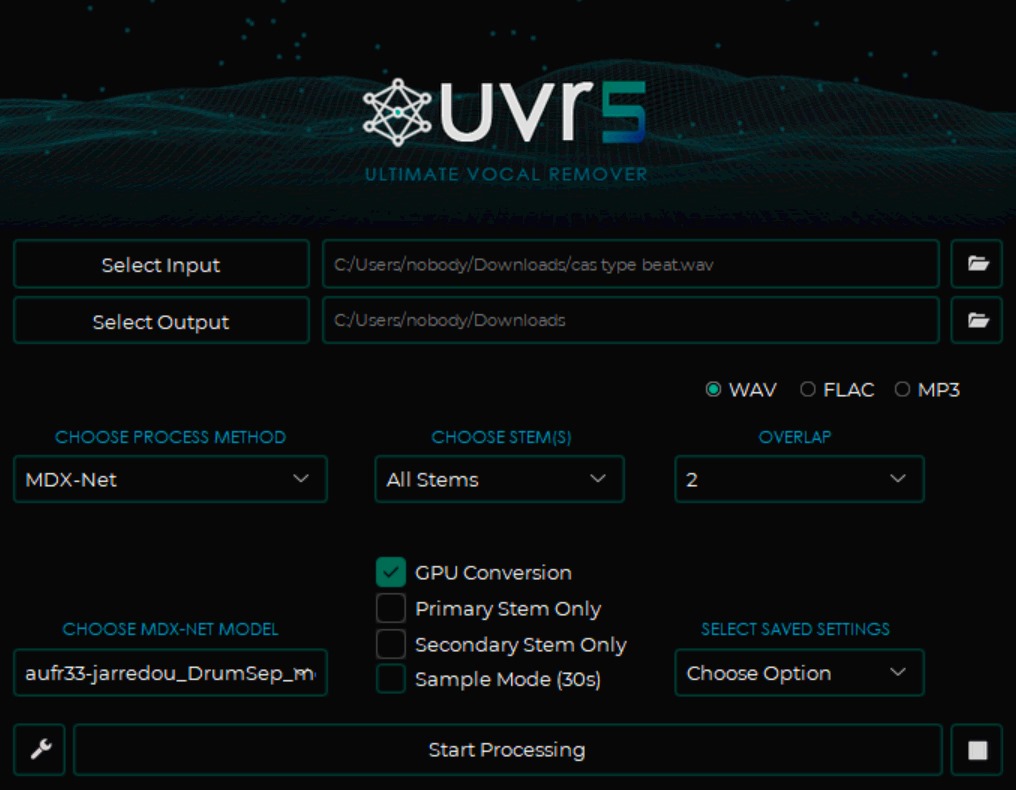
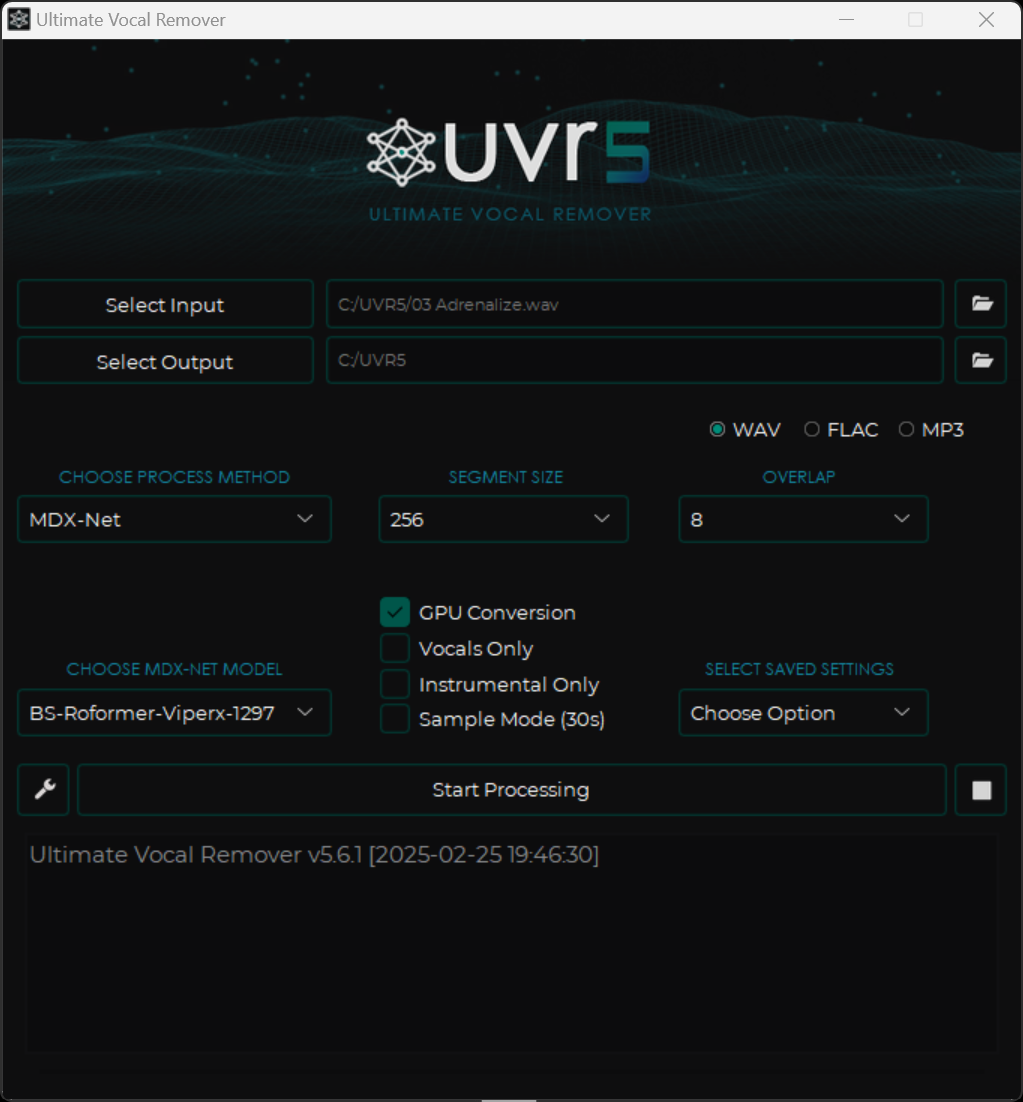
Below you can see typical settings on the main page of the UVR5 GUI.
- Segment Size = Default is what you should start with. Use a smaller number if you get an OOM (out of memory) error. You can use a larger number if your GPU has a lot of VRAM. If the whole input audio file doesn’t fit into your GPU’s VRAM, then you can segment it into smaller chunks which are processed individually. Higher segment sizes can potentially improve the speed and quality of the stem splitting process, but are typically not necessary.
- Overlap = 8 is a good value to use as a default. Lower values, like 2, should be the minimum. Larger values can sometimes produce better results, but not always!
- GPU Conversion = Always use this option if you can! Otherwise your CPU will be used, which will take a very long time. An Nvidia GPU is best, and the newer the GPU model and the higher the VRAM, the better.
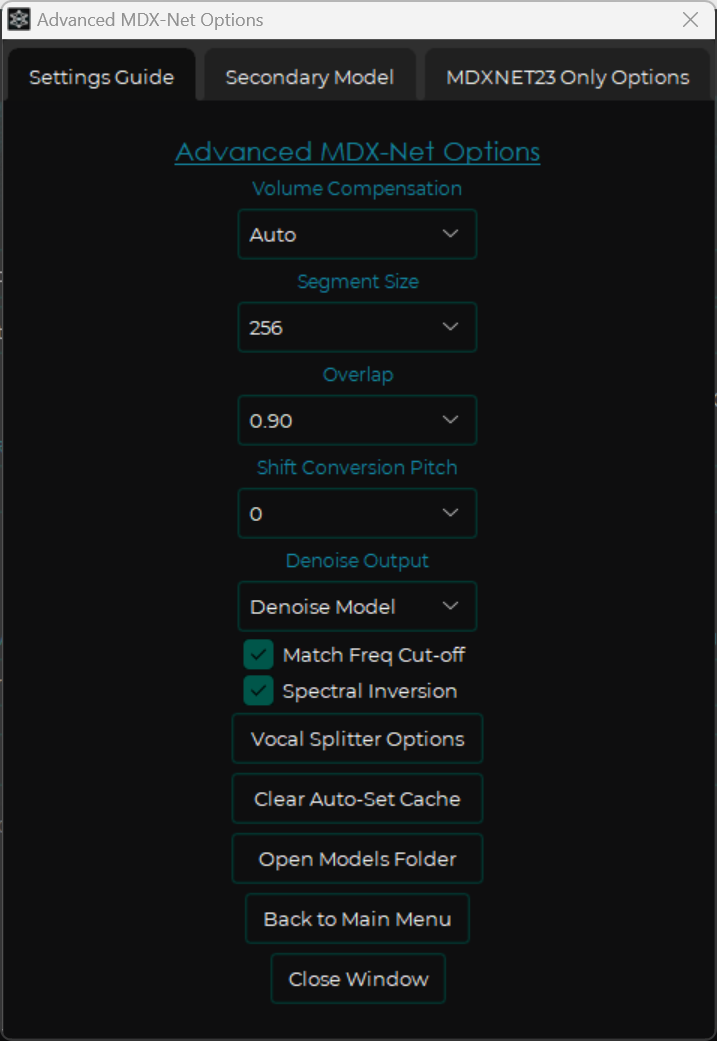
Click on the wrench icon to open the Settings menu. Within this menu, you can select advanced options for both UVR5 in general and for specific model types. In the image below, you can see the Advanced MDX-Net Options menu.
- Segment Size = Default is what you should start with. Use a smaller number if you get an OOM (out of memory) error. You can use a larger number if your GPU has a lot of VRAM. If the whole input audio file doesn’t fit into your GPU’s VRAM, then you can segment it into smaller chunks which are processed individually. Higher segment sizes can potentially improve the speed and quality of the stem splitting process, but are typically not necessary.
- Overlap = Think of this as “from 0% to 99%, how close to a perfect stem do you want?” The lowest value you should use is 0.75, which is good enough for a quick “draft” split. A good value to use for high quality without too much time spent on the processing is 0.85. A value of 0.90 or above may result in a small increase in quality, at the cost of much more processing time. Do not try to use values of 0.95 or above, because you get practically no better quality, and the processing time is extreme!
- Shift conversion pitch = Pitch the audio up or down by a number of semitones before splitting. This can sometimes be useful if you want to focus on isolating a specific element, but you should almost always leave this at the default value of 0.
- Denoise Model = Just leave this off unless you know what you are doing.
- Match Freq Cut-off = Leave this at the default value unless you know what you are doing.
- Spectral Inversion = Always have this enabled! This option enhances audio quality, at practically zero cost.
- Enable Demudder = This can be useful for some models. You can test out the results of using this option or leaving it disabled with specific models, and decide for yourself. If you use this option, select “Combine Methods”.
- Vocal Splitter Options = Leave these disabled. Manually splitting stems in multiple runs tends to produce much better results.
- Secondary Model = Ensemble multiple models and combine/average their results. Takes a lot more time, and the results are not usually as good as just using a single model with proper settings.
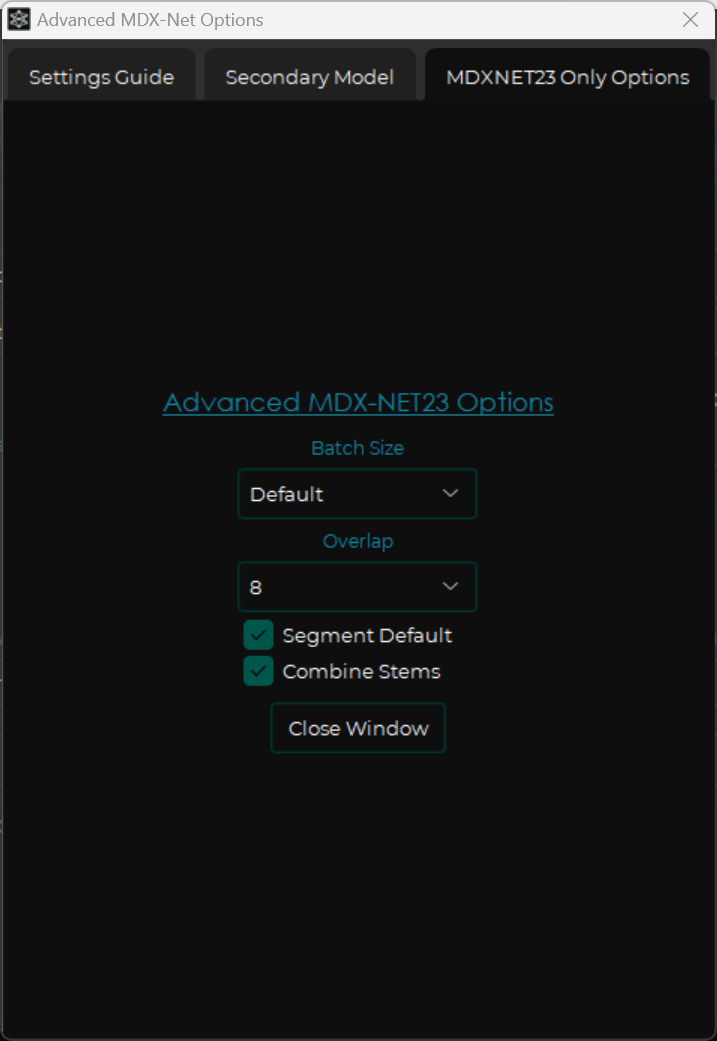
- Multi-Network Only Options =
- Overlap = 8 is a good value to use as a default. Lower values, like 2, should be the minimum. Larger values can sometimes produce better results, but not always!
- Inference mode = Leave this enabled unless you experience issues with a specific model when using an older GPU.
- Segment Default = Leave this at the default value unless you know what you are doing.
- Combine Stems = Leave this at the default value unless you know what you are doing.
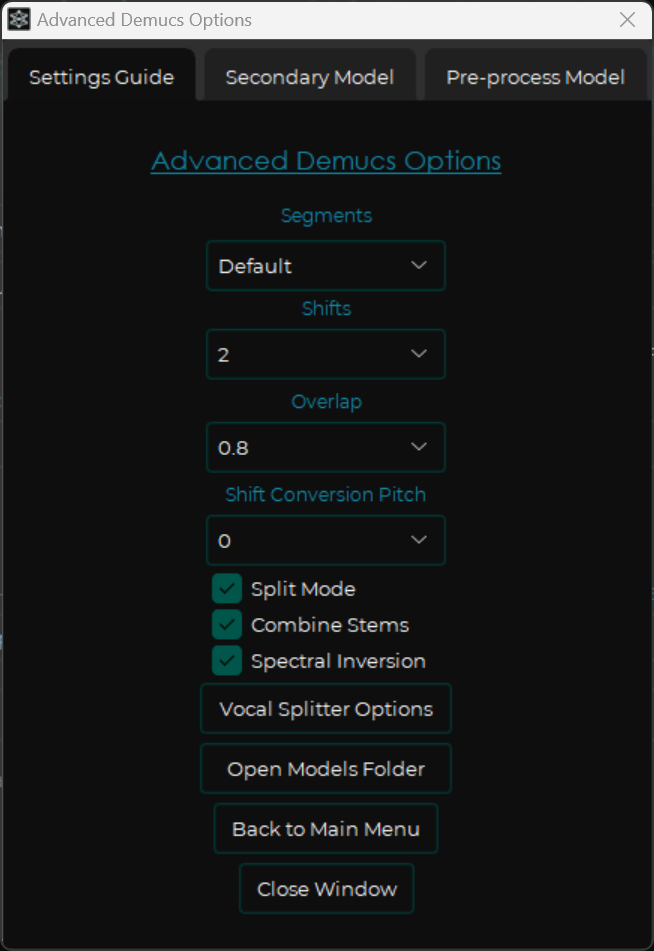
- Segments = Default = Leave this at the default value unless you know what you are doing.
- Shifts = How many copies of the audio to randomly shift in pitch in order to get a better result. 2 is usually plenty, but you can try higher values if you can accept the additional processing time.
- Overlap = Think of this as “from 0% to 99%, how close to a perfect stem do you want?” The lowest value you should use is 0.75, which is good enough for a quick “draft” split. A good value to use for high quality without too much time spent on the processing is 0.85. A value of 0.90 or above may result in a small increase in quality, at the cost of much more processing time. Do not try to use values of 0.95 or above, because you get practically no better quality, and the processing time is extreme!
- Shift conversion pitch = Pitch the audio up or down by a number of semitones before splitting. This can sometimes be useful if you want to focus on isolating a specific element, but you should almost always leave this at the default value of 0.
- Split mode = Leave this on unless you want to try to shove everything into VRAM, which will not work for most computers. This disables the Segments setting.
- Combine stems = Leave this at the default value unless you know what you are doing.
- Spectral Inversion = Always have this enabled! This option enhances audio quality, at practically zero cost.
- Secondary Model = Ensemble multiple models and combine/average their results. Takes a lot more time, and the results are not usually as good as just using a single model with proper settings.
- Pre-process Model = Just leave this off unless you know what you are doing.
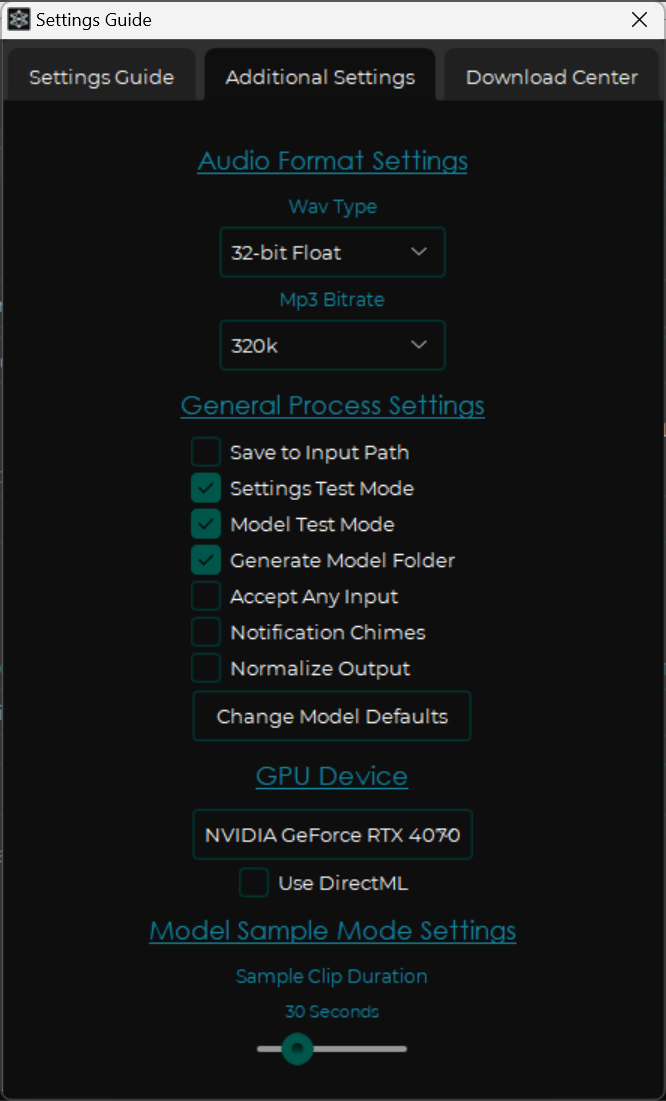
- WAV Type = Use 32-bit Float if you want the maximum audio quality and lowest risk of clipping. Otherwise, use 16-bit or 24-bit integer.
- MP3 Bitrate = Use 320k.
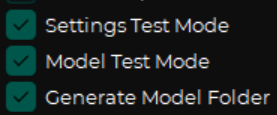
- Settings Test Mode, Model Test Mode, and Generate Model Folder = Enable all of these in order to add a unique timestamp and the model name to the output files, as well as generate folders for each song and model you use. This makes it much easier to figure out what you did in a previous run, and it also makes it much more difficult to accidentally overwrite files. This is especially useful if you are trying to figure out the best models and settings to use for a specific project.
- Accept Any Input = This can be fun for experimental sound design, because you can feed any random file - even a photograph or text file - to the algorithm and see what wacky results you get.
- Notification Chimes = Leave this off, or else you’ll get spooked by a loud noise while waiting for the process to finish.
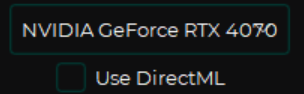
Do not use DirectML if you have an Nvidia GPU!
Which model should I use?
Always check this guide for the latest info:
Instrumental and vocal & stems separation & mastering guide
aufr33-jarredou_DrumSep_model_mdx23c_ep_141_sdr_10.8059.ckpt: “DrumSep-Aufr33-Jarredou” = drum separation, individual kick and hihat and snare and toms and ride and crash.model_bs_roformer_ep_317_sdr_12.9755.ckpt: “BS-Roformer-Viperx-1297” = good vocal + instrumentalmodel_bs_roformer_ep_368_sdr_12.9628.ckpt: “BS-Roformer-Viperx-1296” = pretty much the same as 1297, sometimes a little better or worse- unwa’s Big Beta 7 Mel-Roformer vocal: one of the best newer models for separating vocal stems
- Gabox’s
voc_fv7 Mel-Roformer: one of the best newer models for separating vocal stems - becruily’s “deux” Mel-Band-Roformer: one of the best newer models for separating vocal stems
- 4S-SCNet-XL-ZFTurbo = 4-stem separation which is superior to Demucs v4
2024 UVR5 Guide
If you want to know everything there is to know about UVR5, check out this Google Doc from the people who make UVR5 possible: Instrumental and vocal & stems separation & mastering guide
Also, check out the Audio Separation Discord.
Tl;dr:
- Use UVR5 with Demucs v4 and Mel-Roformer models
- The best results will most likely come from using multiple passes, multiple models, and some manual processing in between passes, especially if you want to separate more than just 2-4 stems.
- If you just want to separate vocals from instrumentals, UVR5 with the latest recommended single model or ensemble will get you even better results than expensive paid software products can produce, even if you only use overlap of 0.75, and you can get results that are indistinguishable from an official stem by going higher.
- A lot of products people will praise online are actually using worse models than the free stuff you can download or use in a Google Colab.
- Everything out there is just using a handful of models that are all open source or have open source equivalents, so you can do a better job with something like UVR5 than you’ll get from paying for stem splitting. The only exception is Spectralayers.
- Spectralayers is great for isolating individual tracks at a granular level, like separating kicks and snares and hihats individually instead of just one drum stem. Even the $1000+ iZotope suite we have at S3 Sound pales in comparison. However, Spectralayers is not cheap, and you will need a high-end GPU to get results without waiting hours or even days for results.
Where do I get UVR5?
- Download UVR5 at https://ultimatevocalremover.com or GitHub.
- Install UVR5.
- Enter the VIP code:
02aeb35c203ed0a9. - Download all of the VIP models, because you won’t be able to once you install the latest beta of UVR5!
- Install the latest beta of UVR5 so that you can use the latest models. You can find the latest beta version in the Google Doc linked above, or just ask in Audio Separation Discord (also linked above). The latest beta at time of writing is: UVR_Patch_4_14_24_18_7_BETA_full_Roformer.exe.
Which models should I use?
If you only want vocal + instrumental, UVR5 with any of the current-gen MDX models will usually get you perfect results. No point in bothering with anything else imo. Paid products might actually get you worse results.
What can UVR5 do?
- Vocals and instrumentals = pretty much perfect!
- 4 stems with just Demucs v4 = usually at least decent, often good, especially the bass stem in my experience. Usually works best if combined with another model in an ensemble or multi-stage process to reduce bleed.
- 6 stems with just Demucs v4 = vocals aren’t as good versus using one of the Mel-roformer and/or MDX23C models. More bleed than the 4-stem model. More “hit or miss” than the 4-stem model, but usually at least a couple of them stems are good, like maybe the drums and vocals are noticeably off but the piano and string stems are perfectly fine.
- You can get better results on multi-stem projects by using ensembles and/or having more than one round of processing. For example, one pass with the
bs_roformer_ep_317_sdr_12.9755model to get an excellent vocal + instrumental stem pair, then a second pass with a Demucs v4 model to split the instrumental stem into drums, bass, and “everything else”, and then a third pass to split the drum stem into individual tracks for kick, snare, toms, hihats, etc. using DrumSep.
If you just want vocal + instrumental stems, you can get results that are incredible, like sometimes you couldn’t tell if it’s the original stem or not, using just one model or one ensemble without any further effort. If you want to break apart main + backing vocals, or several individual instruments, you might get lucky with just one model or ensemble, but you’ll probably get better results with two passes.
The more stems/tracks you want to separate, the more passes you probably need. The more stems you want to separate, the higher the risk of bleed, like part of the kick missing from the kick stem and instead being part of the bass stem. You can tweak parameters, use ensembles, and/or perform some additional processing to refine the results if you don’t mind investing some extra time and effort to get closer to “perfect” results.
For example, maybe the vocal + instrumental stem split is perfect, but the kick/bass separation isn’t good enough, or the lead synth and the guitar are too similar for one model to separate at all. You could then set the perfect vocal aside, focusing on the instrumental only. Maybe you split the instrumental with one 4-stem model that is only good with bass, so you get a good bass stem but the drums and guitar and synth are all not very good. No problem, you still got a good bass stem, which you set aside along with the good vocal stem you got earlier. Then maybe you run another multi-stem model that is only good at drums but not so much at anything else. Again, you get a good drum stem but the other stems you just delete. Now you have set aside good vocal, bass, and drum stems. Outside of UVR5 or any other stem splitter, you combine the 3 good stems you have, invert the phase of their combined mix, and then add that signal to the original audio to get a fourth stem that has everything but the vocals, bass, and drums. Now you process this with an additional model, maybe something that is good at separating the guitar from the lead synth and nothing else. Now you have near-perfect vocal, drum, bass, guitar, and synth stems. It might have taken several rounds of processing, but the only thing you had to do manually was a simple phase inversion, and 90% of the time was spent by the computer, not you.
Vocal + instrumental is usually just a couple of clicks and a few minutes of processing and then you have the best results possible; in fact, they can be much better than what RipX, RX, Spectralayers, etc. can generate, because you can tweak parameters to optimize for your personal use case.
What about further stem splitting, like individual drum hits?
At the far opposite end of the spectrum, if you want to break out individual stems for every single instrument - like down to individual tracks instead of stems, such as one file for kick, one file for snare, one file for lead guitar, one file for rhythm guitar, one file for bass guitar, one file for bass synth, etc. - then I’d consider paying for Spectralayers for the convenience. Otherwise you’ll need to run several rounds of splitting, probably with demanding settings to eke out every bit of precision and accuracy, plus some manual processing in the DAW to clean up intermediate audio files. Doing this on your own with just UVR5 and the DAW will probably get better results than relying on Spectralayers or MVSep or another paid product, because you control all of the settings and can make trade-offs using your brain instead of hoping the machine gets everything right every time. But the paid product might be worth it if you would rather get something that might at least be “good enough” and get it Right Now without spending an hour to try to get better results.
Why is Spectralayers so good?
The reason that the latest version of Spectralayers is so good is that it’s using the exact same models that UVR5 can use, with template logic to automate the “use multiple models to extract multiple stems, invert, and process further” steps I covered above. Plus, I think they’ve trained some of the models a little bit further (you can also do this if you have a good GPU, and it’s not as scary as it might seem).
This seems complicated! Can you help me?
If you need any assistance, or just want to hand off the job of stem separation to an experienced engineer, we are here to help! We offer state-of-the-art stem separation which never compromises on quality. Why waste hours of your time trying to rescue a low-quality stem, when you can start with the highest quality material?
Contact us today to take advantage of our $5 per separation job flat rate. Whether you need a vocal + instrumental stem; 4-part stem splitting job with separate drums, bass, vocals, and other instruments; or an even more specialized stem separation job such as isolating individual drum samples, we can deliver better results than any competitor, at a price that fits any budget!
We offer a 100% money back guarantee. If we can’t give you the best stem separation possible, we will refund 100% of your money. If you discover a better stem separation method, please let us know!